
CYBEX
CYBEX GmbHParenting
3.626.00 Reviews
- Version
- 3.0.3 (2026.08.10.11.12)
- Installs
- 50.00K
- Age Rating
- Everyone
Screenshots

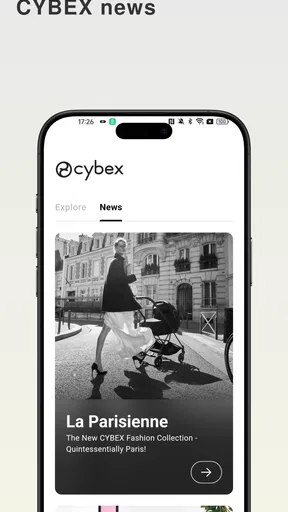
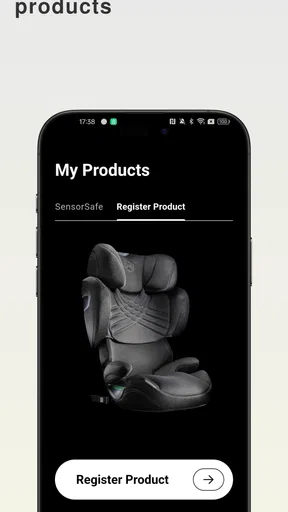
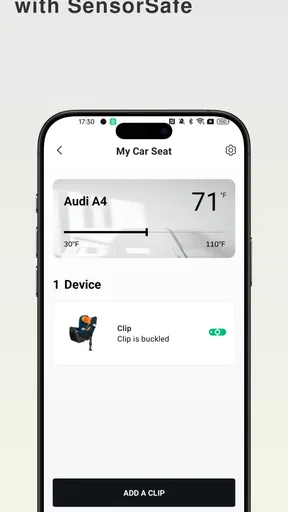
Our Review of CYBEX
 Analysis by Appyee
When I look at a parenting app, I do not begin with the download count or the brand name. I begin with a more practical question: will this make life with baby gear easier, or will it become another icon I forget after the first week? CYBEX is aimed at people who already use, or are considering, products from CYBEX GmbH. It is free, available for Everyone, and positioned as a companion for CYBEX consumers rather than as a general parenting guide.
That distinction matters. I would not approach it as a replacement for a baby tracker, a family calendar, or a broad advice app. I see it more as a brand-specific place to organize the relationship between a parent and CYBEX products. The value depends heavily on whether that relationship already exists. If it does, the app has a clear reason to be on your phone. If it does not, the benefit is less obvious.
How I would decide whether CYBEX belongs on my phone
My first decision criterion is ownership. A parent who has a CYBEX stroller, car seat, carrier, or another product connected to the company will naturally get more from a dedicated companion than someone shopping across several brands. The app makes the most sense when I want one recognizable starting point for product-related tasks instead of searching through packaging, browser tabs, or old emails.
The second criterion is how much organization I want from a mobile tool. Some parents prefer a single app for everything: feeding, sleep, appointments, shopping, and equipment. Others want those jobs separated, using a health tracker for routines and a manufacturer app for product support. CYBEX belongs much more clearly in the second group. I would keep it alongside my everyday parenting tools, not expect it to replace them.
The third question is whether the app reduces friction at the moment I need it. Parenting decisions often happen with one hand free, a tired child nearby, and very little patience for complicated navigation. A useful companion should help me identify the right product, find relevant information, and return to it later without making me repeat the same work. That is the standard I would use before deciding to keep it installed.
The app is currently at version 3.0.3, with a release identifier shown as 2026.08.10.11.12, and it requires Android 8.0 or later. That makes compatibility worth checking before planning around it, especially if an older family phone is being used as a shared device. On a newer Android phone, installation should be a straightforward part of the decision; on an older handset, the operating-system requirement can be the first practical obstacle.
The everyday situation where it earns its place
Imagine preparing for a weekend trip with a baby. I might need to confirm which CYBEX product I own, check its relevant information, and make sure another caregiver can recognize the same item when we hand over the child. In that situation, a dedicated app is more convenient than opening a general search engine and trying to distinguish official material from unrelated results.
The useful habit is to set the app up before the trip, not while standing beside the car. I would install it at home, identify the products I use most, and explore the navigation when nobody is crying. That small preparation changes the experience: the app becomes a reference point rather than an emergency experiment. It is one of the more important trade-offs with any manufacturer companion—its usefulness grows when I invest a little time before I need it.
I also see a practical benefit for shared parenting. One parent may have chosen the equipment while another handles the morning routine, grandparents may help occasionally, and a babysitter may need basic product context. A common app can reduce the need to forward screenshots or explain where information came from. I would still give people direct instructions for safety-critical tasks, but the app can support a more consistent handoff.
What makes the brand-specific approach useful
The strongest idea here is focus. A general parenting app has to cover many kinds of families and many kinds of products. CYBEX can concentrate on its own ecosystem. For me, that means less mental sorting when I am looking for something connected to a CYBEX item. I do not have to remember which third-party app might contain the right manual or product detail.
This focus is especially helpful after a purchase. The first days with new baby equipment often involve more questions than expected: how to adjust something, which accessories belong with it, or where to find official guidance. Even when I already know the basics, having a consistent digital reference is more convenient than storing paper instructions in a drawer that I may not be able to find later.
A less obvious advantage is continuity between shopping and ownership. Parents often research a product before buying it, then use it for months or years afterward. A brand app can sit across both stages: first helping me understand whether the CYBEX ecosystem suits my needs, then remaining useful after the box is gone. That is a better long-term role than an app that only tries to persuade me to buy something.
There is also a trust advantage in using the developer’s own channel. The developer is CYBEX GmbH, so the app is directly associated with the company whose products I may be using. That does not mean I should accept every instruction without thinking—car-seat and child-safety guidance always deserves careful attention—but it does give the app a clear source and purpose.
Small workflows that make the experience better
My first tip would be to treat the app as a product library, not as a daily social or wellness destination. Open it when I have a concrete equipment question, and keep my broader family routines in tools designed for those jobs. This prevents disappointment and makes the app easier to judge on what it is actually trying to do.
My second tip is to use it during a calm setup session with the physical products nearby. If I have more than one CYBEX item, I would identify each one carefully instead of assuming that a similar-looking model is the same. That simple check can prevent confusion later, particularly when a partner or relative is helping with the child.
My third tip is to make the app part of a handover routine. Before a trip or a change in childcare, I would show the other adult where the relevant product information lives and explain which parts still require direct supervision. The app can support communication, but it should not become a substitute for demonstrating how equipment is used safely.
A fourth useful habit is to review whether I still need it after the initial setup. Free apps are easy to install and easy to ignore. If I own CYBEX products and return to the app whenever I need product guidance, it has earned its storage space. If I opened it once and have no realistic reason to return, removing it is a sensible choice rather than keeping it out of habit.
Where CYBEX wins, and where another type of app fits better
CYBEX wins when the problem is brand-specific organization. It is a sensible companion for a parent who wants CYBEX-related information gathered in one place and prefers an official source over scattered web searches. It also has a clear audience: existing CYBEX consumers, rather than every parent regardless of the equipment they use.
The free price helps with that decision. I can try it without adding a subscription to an already expensive stage of family life. That does not automatically make it essential, but it lowers the cost of testing whether the workflow is useful. The app has passed 50 thousand installs and holds a 3.6 average from 691 ratings, which suggests a real user base while also reminding me that the experience will not be perfect for everyone.
I would read that average as a reason to keep expectations measured. A manufacturer companion can be valuable in a narrow situation without becoming a five-star daily favorite. Parents may install it for one product task, use it briefly, and judge it differently from someone who wants a long-term equipment hub. The rating tells me it is worth trying, not that it will solve every parenting problem.
Where does a general parenting app fit better? If my priority is tracking sleep, feeding, medication, milestones, or shared family routines, I would choose a tool built around those activities. Those apps are designed around the child’s day, while CYBEX is designed around the relationship with CYBEX products. Combining the two categories can work well, but replacing one with the other would be a mistake.
A retailer or search engine may be better during the earliest shopping stage if I am comparing many manufacturers. CYBEX is naturally strongest once I am already interested in its products. I would not download it expecting a neutral comparison of every stroller or car seat on the market. For broad research, I would use independent sources; for managing the CYBEX side of the decision, the dedicated app is more relevant.
Paper manuals and saved documents still have a place too. They do not depend on battery life, account access, or a phone being available in the moment. I would keep important safety information accessible offline or in another reliable form, particularly before travel. The app is convenient, but convenience should support safe preparation rather than become the only backup.
Limitations I would consider before installing
The narrow audience is the biggest limitation. If my household uses several brands and I do not own a CYBEX product, the app may feel like an extra stop rather than a useful home base. Even if I am interested in CYBEX, I would not expect a brand companion to replace independent advice or a complete family-management system.
There is also a likely learning-cost trade-off with any product-centered app. I have to identify the right products, understand the app’s structure, and remember to return to it when needed. That is worthwhile for repeated use, but less attractive if I only need one piece of information once. A browser search may be faster for a single, simple question.
Another limitation is that official information and personal circumstances are not the same thing. A product guide can explain equipment, but it cannot know the exact fit of a child, the condition of a vehicle, or the way a particular family uses an item. I would use the app for product context and combine it with professional guidance where safety or health is involved.
The Everyone age rating makes the app broadly accessible, but that should not be confused with the equipment itself being suitable for every child or situation. The rating describes the app’s audience, not a blanket recommendation for every CYBEX product. I would still follow the age, size, and usage instructions associated with the specific item I own.
The cost of switching from other tools
Switching to CYBEX is relatively easy if I am moving from scattered product searches to one brand-specific place. The main cost is not money; it is setup time and a change in habit. I need to stop treating every equipment question as a new web search and instead remember to check the app first.
The switch is less attractive if I already have a carefully organized folder of manuals, notes, and family instructions that everyone understands. In that case, CYBEX has to offer enough convenience to justify adding another workflow. I would test it with the product I use most often rather than migrating everything immediately.
I also would not abandon a general parenting tracker just because I installed this app. The better arrangement may be division of labor: one tool for the child’s routine, another for CYBEX equipment, and a shared calendar for appointments. That setup creates more than one app, but it can be clearer than forcing one application to handle unrelated tasks.
For families sharing devices, I would think about who needs access and when. A parent may use the app regularly, while a grandparent only needs occasional instructions. The practical question is whether the app makes that handoff simpler than a printed note or a message. If it does, the benefit is real; if not, the extra installation may not be justified.
My recommendation for different kinds of parents
I recommend trying CYBEX if you already own CYBEX equipment and want an official, product-focused companion. The combination of a free download, broad age rating, and a clear brand purpose makes the experiment low risk. I would install it before a trip, before handing childcare to someone else, or when setting up a new product—not only after a problem appears.
I would recommend it less strongly to parents who want one all-in-one parenting dashboard. The app’s identity is too specific for that expectation. For sleep logs, feeding records, reminders, and family scheduling, another category of app will probably serve you better, with CYBEX kept as a supporting tool if you use its products.
I would also skip it for now if I am only casually browsing baby gear from many brands. Independent comparison resources are more suitable for that stage. Once I choose CYBEX or bring one of its products home, the app becomes easier to justify because its focused purpose matches a real ownership need.
Overall, I see CYBEX as a practical companion rather than a complete parenting solution. Its success depends on a simple match: CYBEX products in my home and a desire to keep their information easier to reach. I would not install it because every parent needs another app. I would install it because, in the right household, centralizing product guidance can remove a small but recurring source of frustration.
That is the decision I would give a friend: try it if your equipment already belongs to the CYBEX ecosystem, keep your expectations focused, and judge it by whether it helps during real handoffs, trips, and setup moments. With over 50 thousand installs and a 3.6 average, it has enough presence to merit a fair test, while the rating also supports an honest conclusion: CYBEX is most useful as a focused brand companion, not as a universal parenting app.
Verdict
Strengths of CYBEX
- Real-time ride tracking helps parents monitor trips and arrival times.
- Supports multiple family members with shared access to the account.
- Digital booking makes arranging rides faster than calling by phone.
- Trip details and notifications improve visibility for guardians.
- Useful option for families needing scheduled child transportation.
Limitations of CYBEX
- Availability may be limited to selected cities and service areas.
- Ride prices can vary depending on distance, timing, and demand.
- Requires a reliable internet connection for tracking and updates.
- Some features may require account verification and personal information.
- Cancellations or schedule changes may depend on driver availability.
Similar Picks in This Category
View All
Family Space
Motorola Mobility LLC.3.9

شرطة الأطفال - مكالمة وهمية
Oub Apps4.1

Findmykids: Parental Control
LETEM LTD4.6

Pregnancy + | Tracker App
Philips Electronics UK Limited4.8

Policía de niños - para padres
Kids police4.7

Pregnancy App
Amila4.9
Frequently Asked Questions
What is the CYBEX app used for?
The CYBEX app is designed to support users of CYBEX child-safety products, such as car seats and strollers. Depending on the product and region, it can provide product information, setup guidance, safety instructions, registration features, warranty details, and access to customer support. It is especially useful for parents who want digital assistance while choosing, installing, or maintaining CYBEX equipment.
Can I use the CYBEX app without owning a CYBEX product?
You may be able to download and browse parts of the CYBEX app without owning a product, but many of its most useful functions are connected to a specific CYBEX item. Features such as product registration, personalized instructions, compatibility information, or service support may require you to select or scan a product. Availability can also differ depending on your country and the product range sold there.
Does the CYBEX app help with car-seat installation?
The app may provide installation instructions, product-specific guidance, videos, and safety recommendations for compatible CYBEX car seats. However, it should be treated as a support tool rather than a replacement for carefully reading the official manual or consulting a qualified child-passenger-safety professional. Always verify that the seat, vehicle, child’s size, and installation method are compatible before driving.
Is the CYBEX app free to download and use?
The CYBEX app is generally available to download without an upfront purchase, although the exact availability and included features may vary between Android, iOS, and different countries. The app is primarily intended to support CYBEX products, so owning a compatible product may be necessary to benefit from all functions. Check the relevant app store listing for current requirements, permissions, and any optional services.
What information or permissions does the CYBEX app require?
The permissions requested by the CYBEX app can depend on the features you use and the operating system on your phone. You may be asked to provide an account, contact details, product information, or location and camera access for functions such as product scanning or regional support. Before registering, review the app’s privacy policy and only grant permissions that are necessary for the features you intend to use.
